Screws directly into 3D printed plastic
This page collects practical guidelines for fastening parts with screws in FDM 3D printed plastic. The focus is on useful starting values for prototypes, small enclosures, PCB mounting, brackets and workshop-grade mechanical parts.
Contents
- Overview
- General guidelines
- Material choice
- Table: screws directly into plastic, M2–M12
- Metric thread dimensions and pitch
- When printed threads make sense
- Alternatives: inserts, captive nuts and through bolts
- Hex nut geometry and dimensions
- Nut pockets and surrounding wall thickness
- Clearance holes for screws
- Practical recommendations by screw size
- Visual sketches
- Practical workflow
Overview
Driving screws directly into printed plastic works surprisingly well in many prototype and light-duty designs. It is especially useful for small electronics enclosures, PCB standoffs, covers, internal brackets and jigs.
Good use cases
- small electronics enclosures
- PCB mounting bosses
- light-duty brackets
- internal mechanical features
- prototypes and one-off parts
Less suitable for
- high load applications
- frequent disassembly
- large screw sizes
- high temperature environments
- safety-critical parts
General guidelines
1. Print a test piece first
Holes in FDM prints often come out slightly smaller than modeled. Before using a value in a real part, print a small test strip with several hole sizes and try the actual screw.
2. Let the screw clamp, not locate
When possible, use locating pins or geometry to position the part, and let the screw provide clamping force. This is usually more reliable than asking the screw to both locate and fasten.
3. Use enough thread engagement
For screws driven directly into plastic, a practical starting point is:
| Rule of thumb | Use |
|---|---|
| 1.5 × screw diameter | Minimum for many light-duty applications |
| 2 × screw diameter | Good general starting point |
| > 2 × screw diameter | Possible, but often gives diminishing returns |
4. Make the screw boss large enough
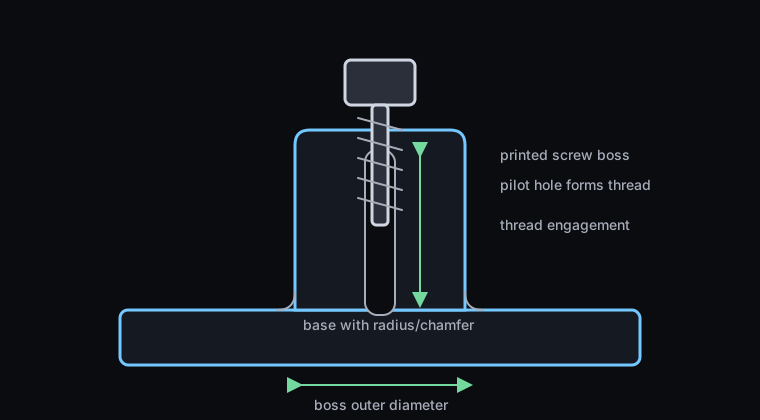
A thin boss can split when the screw forms threads. A useful starting point is: boss outer diameter ≈ 2.5–3 × screw diameter.
5. Add a radius or chamfer at the base
A screw boss rising straight out of a flat surface is weaker than one with a fillet, chamfer or supporting ribs at the base. Avoid sharp internal corners where stress can concentrate.
6. Consider layer orientation
FDM parts are weakest between layers. A vertical boss printed upward from a base plate is often fine for light-duty fastening. Side-loaded threads or features that try to split the layers apart are much weaker.
7. Direct screws are best for low to moderate disassembly
Screws driven directly into plastic are excellent for prototypes, but repeated disassembly will eventually wear the plastic thread. For parts that will be opened often, use heat-set inserts, captive nuts or through bolts.
Material choice
| Material | Strengths | Weaknesses | Comment |
|---|---|---|---|
| PLA | Stiff, accurate, easy to print | Brittle, lower heat resistance | Good for prototypes, but not ideal for repeated screw use |
| PETG | Tough, forgiving, good general purpose material | Softer and less crisp than PLA | Very useful for enclosures and practical workshop parts |
| ABS / ASA | Tough, better heat resistance | More demanding to print | Good for more durable parts |
| Nylon / PA | Tough, wear resistant, mechanically strong | Requires better print control and drying | Excellent when printed correctly |
Practical pilot holes for screws directly into plastic
These are practical CAD starting values for using a normal metric machine screw to form threads directly in FDM printed plastic.
| Thread | Pilot hole in CAD | Recommended boss Ø | Thread engagement | Comment |
|---|---|---|---|---|
| M2 | 1.6 mm | 5.0 mm | 3–4 mm | Good for small electronics modules |
| M2.5 | 2.0 mm | 5.5–6.0 mm | 4–5 mm | Good for small enclosures |
| M3 | 2.5 mm | 6.5–7.0 mm | 4.5–6 mm | Excellent general-purpose size |
| M4 | 3.3 mm | 8.5–10 mm | 6–8 mm | Good for stronger printed parts |
| M5 | 4.2 mm | 10.5–12 mm | 7–10 mm | Works, but inserts or nuts start to become attractive |
| M6 | 5.0 mm | 12–14 mm | 9–12 mm | Possible, but a nut or insert is often better |
| M8 | 6.8 mm | 16–18 mm | 12–16 mm | Use only for simple or low-cycle applications |
| M10 | 8.5 mm | 20–24 mm | 15–20 mm | Through bolt and nut is usually better |
| M12 | 10.2 mm | 24–28 mm | 18–24 mm | Avoid direct plastic threads unless the load is very low |
Metric thread dimensions and pitch
Standard metric threads are specified as M diameter × pitch. If the pitch is not written out, the normal assumption is the standard coarse pitch. For example, M6 usually means M6 × 1.0.
| Thread | Nominal major Ø | Standard coarse pitch | Common metal tap drill | Approx. internal minor Ø | Approx. pitch Ø | Practical printed-plastic note |
|---|---|---|---|---|---|---|
| M2 | 2.0 mm | 0.40 mm | 1.6 mm | 1.57 mm | 1.74 mm | Too small for reliable printed threads; good for screws into pilot holes |
| M2.5 | 2.5 mm | 0.45 mm | 2.05 mm | 2.01 mm | 2.21 mm | Good for small hardware, but printed threads are still fiddly |
| M3 | 3.0 mm | 0.50 mm | 2.5 mm | 2.46 mm | 2.68 mm | Excellent hardware size; direct screw, nut or insert usually better than printed thread |
| M4 | 4.0 mm | 0.70 mm | 3.3 mm | 3.24 mm | 3.55 mm | Usable for direct screws; printed threads possible but not always pleasant |
| M5 | 5.0 mm | 0.80 mm | 4.2 mm | 4.13 mm | 4.48 mm | Borderline useful for printed threads; inserts or nuts often better |
| M6 | 6.0 mm | 1.00 mm | 5.0 mm | 4.92 mm | 5.35 mm | Printed threads start to become reasonable if the part is well printed |
| M8 | 8.0 mm | 1.25 mm | 6.8 mm | 6.65 mm | 7.19 mm | Good starting point for practical printed threads |
| M10 | 10.0 mm | 1.50 mm | 8.5 mm | 8.38 mm | 9.03 mm | Printed threads are realistic; through bolts or nuts are still stronger |
| M12 | 12.0 mm | 1.75 mm | 10.2 mm | 10.11 mm | 10.86 mm | Printed threads can work well for low to moderate loads if designed generously |
Basic metric thread geometry
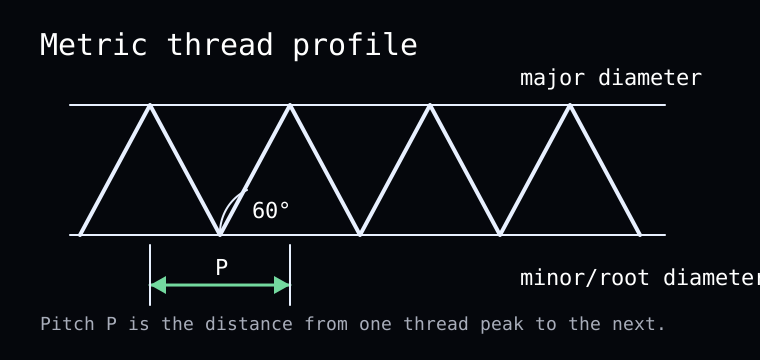
ISO metric threads use a 60° thread angle. The thread pitch, P, is the distance from one thread peak to the next.
| Value | Approximate formula | Meaning |
|---|---|---|
| Pitch diameter | D - 0.6495 × P | Approximate effective thread diameter |
| Internal minor diameter | D - 1.0825 × P | Approximate root diameter of an internal thread |
| External minor diameter | D - 1.2269 × P | Approximate root diameter of an external thread |
| Rule-of-thumb tap drill | D - P | Simple practical estimate for cutting threads in metal |
Coarse vs fine threads in printed parts
Fine threads have smaller pitch and more thread turns per millimeter. That can be useful in metal, but in FDM printed plastic it often makes the thread weaker, more sensitive to print quality and easier to strip.
When printed threads make sense
Printing the thread itself is different from letting a metal screw form threads in a pilot hole. For FDM printing, small threads are often unreliable or annoying to use.
| Thread type | Practical guideline |
|---|---|
| Internal printed threads | Possible from M5, useful from M6, much better from M8 and upward |
| External printed threads | Possible from M4–M5, more practical from M6 and upward |
M2–M4: avoid printed threads in most FDM parts
M5–M6: possible but sensitive
M8 and larger: starts to become reasonable
Alternatives: inserts, captive nuts and through bolts
Heat-set inserts
Use heat-set inserts when the part will be assembled and disassembled many times, or when a durable metal thread is needed. They are especially useful for M3, M4 and M5.
Captive nut pockets
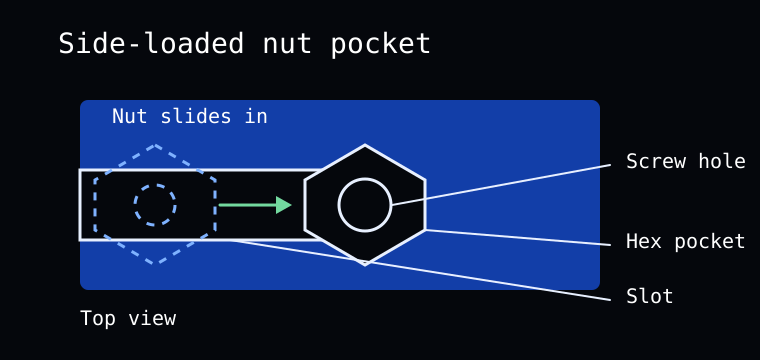
A captive nut pocket is often one of the best solutions in printed plastic. It gives a strong metal thread without special tools, and works well when the design has enough room for a nut.
Through bolt and nut
For high loads, larger screws or very predictable strength, a through bolt and nut is often the simplest and strongest solution.
Printed threads
Printed threads are useful for large parts, coarse threads and designs where loose metal hardware is undesirable.
Hex nut geometry and dimensions
To design a hex nut pocket, you need the across-flats dimension, nut thickness, side length and across-corners dimension.
For a regular hexagon with across-flats value AF:
| Value | Formula |
|---|---|
| Side length | AF / 1.732 |
| Across corners | AF × 1.155 |
| Thread | Nut AF | Nut thickness | Hex side length | Across corners |
|---|---|---|---|---|
| M2 | 4.0 mm | 1.6 mm | 2.31 mm | 4.62 mm |
| M2.5 | 5.0 mm | 2.0 mm | 2.89 mm | 5.77 mm |
| M3 | 5.5 mm | 2.4 mm | 3.18 mm | 6.35 mm |
| M4 | 7.0 mm | 3.2 mm | 4.04 mm | 8.08 mm |
| M5 | 8.0 mm | 4.0 mm | 4.62 mm | 9.24 mm |
| M6 | 10.0 mm | 5.0 mm | 5.77 mm | 11.55 mm |
| M8 | 13.0 mm | 6.5 mm | 7.51 mm | 15.01 mm |
| M10 | 17.0 mm | 8.0 mm | 9.81 mm | 19.63 mm |
| M12 | 19.0 mm | 10.0 mm | 10.97 mm | 21.94 mm |
Nut pockets and surrounding wall thickness
Recommended clearance in the nut pocket
- AF + 0.2 mm = tight fit
- AF + 0.3 mm = good general starting point
- AF + 0.4 mm = safer if the printer tends to make holes small
Recommended pocket depth: nut thickness + 0.2 to 0.4 mm.
Material around the nut pocket
| Area | Recommended minimum |
|---|---|
| Radial wall around pocket, M2–M3 | At least 1.2 mm |
| Radial wall around pocket, M4–M6 | At least 1.5–2.0 mm |
| Radial wall around pocket, M8–M12 | At least 2.5–3.5 mm |
| Material below small nuts | At least 1.2 mm |
| Material below M4–M6 nuts | Preferably 1.5 mm or more |
| Material below M8+ nuts | Preferably 2.0 mm or more |
Clearance holes for screws
When the screw should pass freely through a printed part, use a clearance hole instead of a pilot hole.
| Thread | Clearance hole |
|---|---|
| M2 | 2.2 mm |
| M2.5 | 2.7 mm |
| M3 | 3.2 mm |
| M4 | 4.3 mm |
| M5 | 5.3 mm |
| M6 | 6.4 mm |
| M8 | 8.4 mm |
| M10 | 10.5 mm |
| M12 | 13.0 mm |
Practical recommendations by screw size
M2
- Directly into plastic: yes
- Captive nut: yes
- Heat-set insert: less common, but available
- Printed thread: usually not worth it
M3
- Directly into plastic: excellent
- Heat-set insert: excellent
- Captive nut: excellent
- Printed thread: usually not worth it
M4
- Directly into plastic: good
- Heat-set insert: good
- Captive nut: good
- Printed thread: possible, but often unnecessary
M5–M6
- Directly into plastic: possible
- Heat-set insert: good
- Captive nut: very good
- Printed thread: possible to reasonable
M8–M12
- Directly into plastic: rarely the best choice
- Captive nut: good
- Through bolt: very good
- Printed thread: more realistic from M8 and upward
Visual sketches
1. Screw directly into plastic
2. Side-loaded nut pocket
Practical workflow
The most reliable method is to create your own internal standard based on test prints.
- Choose a starting value from the table
- Print a small test piece with several hole diameters
- Try the actual screw, nut or insert
- Adjust the CAD value in 0.1–0.2 mm steps
- Save the result as your standard for that printer, material and slicer profile
Quick summary
- M2–M4: direct screws into plastic often work very well
- M5–M6: possible, but nuts or inserts often become better
- M8–M12: usually better with captive nuts, through bolts or printed coarse threads
- Printed threads: become practical from roughly M6–M8 and upward
- Captive nut pockets: one of the most useful robust fastening methods in printed plastic
Last updated manually. Values should be tuned using real test prints.